
Top Laptop Speakers
The 10 Laptop Speakers in our lineup, chosen independently, never paid for.
 Highly reviewed
Logitech
Logitech Z207 2.0 Stereo Computer Speakers with Bluetooth
 Highly reviewed
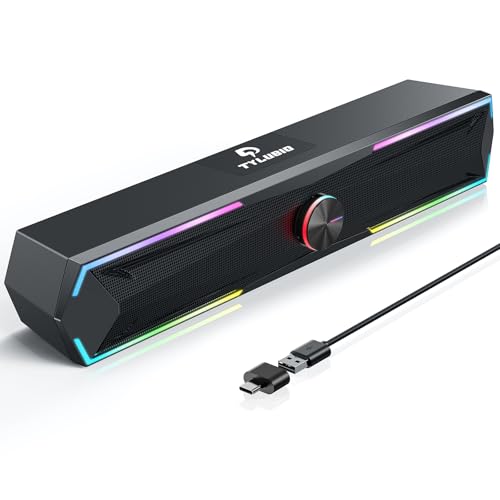
Tylubio
Tylubio Computer Speakers for PC Desktop, Flowing LED Under-Monitor Soundbar with Clear Stereo Sound, Bluetooth & USB 2-in-1 Audio Input, PC Speaker for Monitor Laptop, Black
 Well reviewed
OHAYO
OHAYO 60W Computer Speakers for Music and Gaming, Active Bluetooth 5.3, Stereo 2.0 Speakers for Desktop PC or Laptop, 3.5mm Aux RCA USB Input, 1 Pair, Black

 Well reviewed
Amazon Basics
Amazon Basics Stereo 2.0 Speakers for PC or Laptop with Volume Control, 3.5mm Aux Input, USB-Powered, 1 Pair, Black
Creative
Creative Pebble V3, 2.0 USB-C Desktop Speakers, Bluetooth 5.0, Black
Anker
Anker soundcore 2 Portable Bluetooth Speaker, Stereo Sound, IPX7
XKX
Computer Speakers for Desktop PC Monitor, USB Plug-in, Wired, Computer Soundbar for PC, Laptop Speakers with Adaptive-Channel-Switching, Loud Sound, Deep Bass, USB C Adapter, Easy to Clip on Monitor
Bluedee
Bluedee Computer Speakers for Desktop PC, Bluetooth AUX Computer Sound Bar
Creative
Creative Pebble 2.0, USB Desktop Stereo Speakers for PC/Laptop, Black
The most-reviewed laptop speakers on Proovad come from a mix of audio and accessory brands, with Amazon Basics appearing twice alongside Anker, Edifier, and others. These are compact external speakers that improve on a laptop's thin built-in sound, ranging from simple USB-powered stereo pairs to small soundbars and Bluetooth units. Connection type and power are the main variables: USB for plug-and-play simplicity, a 3.5mm jack for analog, or Bluetooth for wireless. Because these speakers are judged on the audio upgrade they deliver, their footprint, and how easily they connect, sound quality relative to size and a fuss-free hookup matter most.
What to look for
Start with how you want to connect, since it shapes convenience. USB-powered speakers draw power and often audio from one cable for true plug-and-play, a 3.5mm analog connection works with almost any device but needs a separate power source for larger units, and Bluetooth frees you from cables at the cost of pairing and charging.
Match size and power to your space and use. A small stereo pair or compact soundbar suits a desk and a single listener, delivering clearer dialogue and fuller sound than a laptop. If you want room-filling volume or bass, look for higher-powered units, accepting the larger footprint.
Weigh sound character against expectations. Tiny speakers improve clarity and volume but cannot reproduce deep bass, so a model with a modest bass port or a separate subwoofer matters if you want low end. For voice and general use, a clean, balanced stereo pair is plenty.
Finally, consider the desk practicalities: cable length and clutter, whether the speakers need their own outlet, and onboard controls for volume. A tidy, well-placed setup you can adjust easily gets used far more than a powerful one that is awkward on the desk.
Frequently asked questions
USB, 3.5mm, or Bluetooth laptop speakers?
USB speakers are the simplest, often drawing power and audio from one cable. A 3.5mm analog connection works with nearly any device but larger units need separate power, and Bluetooth is wireless but requires pairing and charging. Choose by the convenience you want.
Will small laptop speakers have good bass?
Compact speakers improve clarity and volume over a laptop but cannot produce deep bass from their size. If low end matters, look for a model with a bass port or a separate subwoofer; for voice and general use, a clean stereo pair suffices.
Do laptop speakers need their own power?
USB-powered and many Bluetooth speakers draw power over USB or a built-in battery, while larger analog speakers usually need a wall outlet. Check the power requirement so it fits your desk setup.
Stereo pair or soundbar for a laptop?
A stereo pair gives wider left-right separation, while a compact soundbar saves desk space and simplifies placement. Both improve on built-in audio; choose by your desk space and whether stereo width matters to you.
Key terms
- USB-powered
- Speakers that draw power, and sometimes audio, over a USB cable for simple plug-and-play use.
- 3.5mm jack
- The standard analog headphone-style connector that carries audio to speakers from almost any device.
- Bass port
- An opening that reinforces low frequencies, helping small speakers produce more bass than their size suggests.
- Soundbar
- A single elongated speaker housing multiple drivers, saving desk space versus a separate stereo pair.
Top picks
Our top three Laptop Speakers, and what sets each apart.
Logitech
Logitech Z207 2.0 Stereo Computer Speakers with Bluetooth
Ranked #1 of 10 in our Laptop Speakers lineup.
See on AmazonTylubio
Tylubio Computer Speakers for PC Desktop, Flowing LED Under-Monitor Soundbar with Clear Stereo Sound, Bluetooth & USB 2-in-1 Audio Input, PC Speaker for Monitor Laptop, Black
Ranked #2 of 10 in our Laptop Speakers lineup.
See on AmazonOHAYO
OHAYO 60W Computer Speakers for Music and Gaming, Active Bluetooth 5.3, Stereo 2.0 Speakers for Desktop PC or Laptop, 3.5mm Aux RCA USB Input, 1 Pair, Black
Ranked #3 of 10 in our Laptop Speakers lineup.
See on Amazon