
Top Monitors
The 10 Monitors in our lineup, chosen independently, never paid for.
Features
 Highly reviewed
Dell
Dell 27 Monitor - SE2726H - 27-inch FHD (1920x1080) 144Hz 1ms Display, in-Plane Switching (IPS) Technology, AMD FreeSync™, TÜV 3-Star 2X HDMI, Tilt
 Highly reviewed
Samsung
Samsung 34" ViewFinity S50GC Series Ultrawide QHD Monitor, 100Hz, 5ms, HDR10, AMD FreeSync, Ultrawide Screen, Eye Care, Thin Bezels, PIP, PBP, LS34C50DGANXZA, 2023, Black
 Well reviewed
Dell
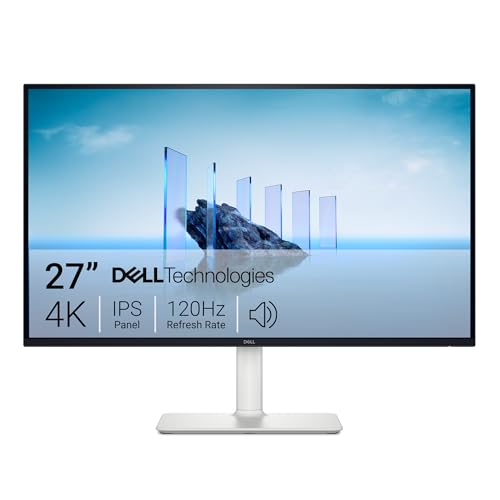
Dell 27 Monitor S2725QS, 4K UHD IPS, 120Hz, 5ms, FreeSync Premium
- 27 in
- 3840 x 2160
- 120 Hz
 Well reviewed
Dell
Dell 27 Plus QHD Monitor - S2725DSM - 27-inch QHD (2560x1440) 144Hz 1ms Display, 2 x 3W Speakers, HDMI/DisplayPort 1.4 Connectivity, Height/Tilt/Pivot/Swivel Adjustability, AMD FreeSync - Ash White
 Well reviewed
LG
LG 27UP650K-W 27-inch Ultrafine 4K UHD (3840 x 2160) IPS Computer Monitor, 60Hz, 5ms, DisplayHDR 400, Reader Mode, Flicker Safe, HDMI, DisplayPort, Tilt/Height/Pivot Adjustable Stand, White
Dell
Dell 27 240Hz Gaming Monitor - SE2726HG - 27-inch FHD (1920x1080) 240Hz Display, in-Plane Switching (IPS) Technology, AMD FreeSync Premium, TÜV 3-Star, 2X HDMI, DisplayPort 1.4, Tilt
- 27 in
- 1920x1080
- 240 Hz
Samsung
Samsung 27" Essential S3 (S36GD) Series FHD 1800R Curved Computer Monitor
Samsung
Samsung 32" Flat Computer Monitor
- 32 in
- 75 Hz
- flat
Acer
Acer 27in FHD 1920x1080 IPS 120Hz Gaming Monitor | Office KB272 G0bi
- 27 in
- 1920 x 1080
- 120 Hz
Popular comparisons
How our top Monitors stack up, head to head.
- Dell 27 Monitor - SE2726H - 27-inch FHD (1920x1080) 144Hz 1ms Display, in-Plane Switching (IPS) Technology, AMD FreeSync™, TÜV 3-Star 2X HDMI, Tilt vs Samsung 27" Odyssey G5 (G51F) Series QHD (1440P) Gaming Monitor
- Dell 27 Monitor - SE2726H - 27-inch FHD (1920x1080) 144Hz 1ms Display, in-Plane Switching (IPS) Technology, AMD FreeSync™, TÜV 3-Star 2X HDMI, Tilt vs Samsung 34" ViewFinity S50GC Series Ultrawide QHD Monitor, 100Hz, 5ms, HDR10, AMD FreeSync, Ultrawide Screen, Eye Care, Thin Bezels, PIP, PBP, LS34C50DGANXZA, 2023, Black
- Dell 27 Monitor - SE2726H - 27-inch FHD (1920x1080) 144Hz 1ms Display, in-Plane Switching (IPS) Technology, AMD FreeSync™, TÜV 3-Star 2X HDMI, Tilt vs Dell 27 Monitor S2725QS, 4K UHD IPS, 120Hz, 5ms, FreeSync Premium
- Dell 27 Monitor - SE2726H - 27-inch FHD (1920x1080) 144Hz 1ms Display, in-Plane Switching (IPS) Technology, AMD FreeSync™, TÜV 3-Star 2X HDMI, Tilt vs Dell 27 Plus QHD Monitor - S2725DSM - 27-inch QHD (2560x1440) 144Hz 1ms Display, 2 x 3W Speakers, HDMI/DisplayPort 1.4 Connectivity, Height/Tilt/Pivot/Swivel Adjustability, AMD FreeSync - Ash White
The most-reviewed monitors in this category span 23.8 to 34 inches, with 1080p panels making up the single largest resolution cluster (four of the analyzed products) alongside a meaningful spread of higher-resolution options including QHD, Ultra WQHD, 3440x1440 ultrawide, and one 4K panel. Refresh rates range from 75 Hz all the way to 240 Hz, and response times (where stated) fall between 0.03 ms and 5 ms. IPS is the dominant panel technology, appearing on four products, while curved panels account for three of the ten, including one curved ultrawide. AMD FreeSync is essentially universal here, present on every product that declares a sync technology. HDR support is more selective, appearing on three of the five products that address it at all. Brightness figures, where disclosed, range from 250 to 1500 cd/m2, a gap wide enough to matter in bright rooms.
What to look for
Resolution and screen size interact in ways that catch buyers off guard. A 1080p panel at 24 inches looks sharp and crisp, but stretching that same resolution to 27 inches or beyond softens text noticeably. If you are drawn to the 34-inch ultrawide format, the jump to 3440x1440 or Ultra WQHD is worth taking seriously rather than settling for 1080p at that size. Refresh rate matters most if you game or do fast-paced work: 75 Hz is a comfortable step up from a basic display, but 144 Hz and above meaningfully reduce motion blur during gameplay. FreeSync being nearly universal in this category is genuinely useful, since it eliminates screen tearing without requiring a specific GPU brand. HDR claims deserve scrutiny because the brightness ceiling of the panel determines how much HDR actually delivers. A panel rated at 250 cd/m2 with an HDR badge will not produce the contrast punch that a 1000 cd/m2 or 1500 cd/m2 panel can. Curved screens reward single-user, close-distance setups and feel more immersive on ultrawides, but they can distort color for photographers working from an angle.
Pixel density, not resolution alone, decides how sharp text looks. The same 1080p that is crisp at 24 inches softens noticeably stretched to 27 inches or beyond, so step up to QHD or an ultrawide resolution as the panel grows. If you read and write all day, density matters more than any gaming-oriented spec on the sheet.
Panel type sets the character of the image. IPS, the most common here, gives accurate color and wide viewing angles for shared screens and creative work, while VA and curved VA produce deeper blacks but can smear in fast motion. Confirm the inputs too, since a single panel often pairs with a laptop, a console, and a desktop, and HDMI plus DisplayPort count matters more than it first appears.
Frequently asked questions
Does AMD FreeSync work if I have an NVIDIA graphics card?
Newer NVIDIA GPUs support FreeSync-compatible adaptive sync over DisplayPort and HDMI, so FreeSync monitors are no longer limited to AMD hardware, though you should confirm your specific GPU model supports it before buying.
Is a 1080p panel enough for a 24-inch monitor used mainly for productivity and web browsing?
At 24 inches, 1080p delivers a pixel density that most users find comfortable for everyday tasks, and the format is well-supported by virtually every laptop and desktop GPU without scaling complications.
What does the response time spec actually mean for everyday use?
Response time measures how quickly a pixel transitions between shades, and lower numbers reduce the ghosting or trailing effect behind fast-moving objects. For office work or video streaming, values anywhere in this category's range are fine, but competitive gaming benefits from figures at or below 1 ms.
Are curved ultrawide monitors practical for work tasks as well as gaming?
Curved ultrawides handle productivity well, especially for multitasking, since the extra horizontal real estate replaces two monitors without a bezel in the middle, though some applications do not fully support non-standard aspect ratios and may add black bars or stretch content unexpectedly.
Key terms
- Resolution (1080p / QHD / 4K)
- The pixel grid of the panel. More pixels sharpen text and detail but ask more of the GPU, and the right choice scales with screen size.
- Pixel density (PPI)
- Pixels per inch, the real driver of text sharpness. The same resolution looks denser on a smaller screen and softer as the panel grows.
- IPS panel
- A panel technology known for accurate color and wide viewing angles, favored for productivity and creative work over the deeper blacks of VA.
- Adaptive sync (FreeSync)
- A feature that matches the refresh rate to the GPU output to remove tearing, now widely compatible across both AMD and recent NVIDIA cards.
Top picks
Our top three Monitors, and what sets each apart.
Dell
Dell 27 Monitor - SE2726H - 27-inch FHD (1920x1080) 144Hz 1ms Display, in-Plane Switching (IPS) Technology, AMD FreeSync™, TÜV 3-Star 2X HDMI, Tilt
Ranked #1 of 10 in our Monitors lineup.
See on Amazon
Samsung
Samsung 27" Odyssey G5 (G51F) Series QHD (1440P) Gaming Monitor
Ranked #2 of 10 in our Monitors lineup.
See on AmazonSamsung
Samsung 34" ViewFinity S50GC Series Ultrawide QHD Monitor, 100Hz, 5ms, HDR10, AMD FreeSync, Ultrawide Screen, Eye Care, Thin Bezels, PIP, PBP, LS34C50DGANXZA, 2023, Black
Ranked #3 of 10 in our Monitors lineup.
See on Amazon